2016년 3월 5일 토요일

Advanced Installer

Trial Property


The licensing library defines some properties that you can read from your application. To retrieve trial and licensing information please follow this article.
PropertyDescriptionObservations
TrialNameDisplay Name
LicReqContactContact Mail address used to request computer specific licenses
BuildDateRelease Date of the product specified in options pageDate format: %m/%d/%Y
BuyUrlPurchase URL page opened when an unregistered end-user will press the Buy buttons from the Trial page
TrialExtendContactMail or Web address used when an unregistered end-user will press the “Request trial extension” link
LicenseKeySerial number or license that end-user registered withTo check the license validity you should verify the return code of the licensing "ReadSettings" and "DisplayRegistration" functions. An invalid LicenseKey will cause the application to run in trial mode.
TrialLeftNumber of trial days/runs available when application was startedWhen having "Both" limited trial (days and runs) TrialLeft property is set to the smallest of them
QuantityTrial quantity available for the end-user and specified into the "Limit At" field of the optionspage.This property will increase each time the trial period is extended
TrialMUSet to either "Days" or "Runs" depending on trial type and the TrialLeft property.
CompIdComputer identificationID generated by the licensing library, displayed to the end-user into the “Registration” page and used into the mail sent to the mail address specified by the LicReqContactproperty

License Elements Properties

When a valid license is used, its elements are available as properties. You can read more about license elements and the license format inEdit License Template Dialog.
Properties available depending on the license content:
PropertyDescriptionObservations
IDLicense IDText
SIGNCryptographic secured license signature based on RSA public-key signatureText
MPMaintenance Plan expiring dateDate format: %m/%d/%Y
EXPDate until the license is validDate format: %m/%d/%Y
REG_EXPDate until the user can use the license to registerDate format: %m/%d/%Y
COMP_IDComputer identificationID generated by the licensing library, displayed to the end-user into the “Registration” page and used into the mail sent to the mail address specified by the LicReqContact property
NoteYou can extend the above license elements list with new custom defined elements by editing the license template.

2016년 1월 22일 금요일

MFC Control Open Source 모음

무유님의 블로그 http://mooyou.tistory.com/13

CXListCtrl - Visual Studio 2012에서 컴파일 하기

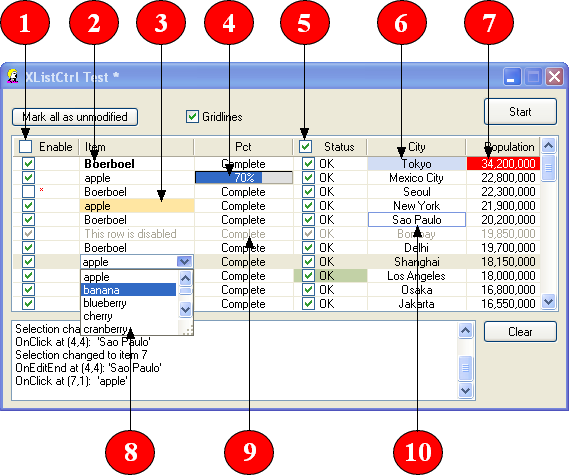
리스트 컨트롤 : http://www.codeproject.com/Articles/1796/XListCtrl-A-custom-draw-list-control-with-subitem

screenshot

Visual Studio 2012를 이용한 컴파일

유용한 TickTalk님의 블로그 http://action713.tistory.com/entry/mfc-listcontrol-xlistctrl

띠또루스님의 블로그에서 퍼 왔습니다.  띠또루스님의 블로그

무작정 컴파일하면 엄청난 에러의 압박이 발생한다.
빌드 configuration을 보면 Uncode용 Debug와 Release가 있다. 이것을 사용하는 편이 훨씬 좋다.

다음은 다른 분들의 해결책을 모아 놓은 것과 나의 삽질 부분이다.


일단 코드프로젝트에서 다운로드를 받는다. 다운로드 받은 솔루션을 실행시킨다.(XListCtrlTest.dsw)


그러면 아래와 같이 나타난다.


모두 예(A)를 눌러서 실행한다.

그러면 클래스뷰를 보거나 솔루션뷰 둘중에 하나를 보면 총 8개의 프로젝트가 존재 하는것을 확인할수 있을것이다. 위에서 부터 차근차근 속성정보로 들어간다.


구성속석-일반 탭에 보면 문자 집합이 멀티바이트로 되어있는데 이것을 유니코드로 바꿔존다.

그리고 나서 C/C++로 간다.


가장 위에 추가포함 디렉토리를 XListCtrl 폴터가 존재하는 절대 경로로 변경해준다.

그리고 가장 밑에 있는 유니코드 지시파일 사용을 아니요로 바꾸어준다.

이것을 8번 반복하고 컴파일하면 에러가 3개정도 나올것이다.
 CWnd::OnActivateApp(bActive, hTask); 여기에서 나오는 에러 문제는

 CWnd::OnActivateApp(bActive, (DWORD)hTask); 옆과 같이 타입 캐스팅을 해주면 되는문제이다.

마찬가지로


if (!XTRACE_SHOW_FULLPATH)
  {
   cp =_tcsrchr(m_file, _T(‘\\’));
   if (cp)
    cp++;
  }

위에서 나오는 문제는

if (!XTRACE_SHOW_FULLPATH)
  {
   cp = (LPTSTR)_tcsrchr(m_file, _T(‘\\’));
   if (cp)
    cp++;
  }
 위와같이 타입 캐스팅을 해주면 되는문제이다.

그리고 중요한것은 무조건 컴파일이 아니라,


XListCtrlDD

XListCtrlDS

XListCtrlSS

위에 3개 먼저 차례로 컴파일 해야 한다는것이다. 나머지는 그냥 컴파일 하면 될것이다.

컴파일이 완료 되면 *.LIB와 *.DLL은 BIN 폴더에 모여 있는것을 확인할수 있으며,

프로젝트에서 사용하고 싶다면 #Include “XListCtrl.h” 만 추가해주면 알아서 라이브러리까지 포함되면서 컴파일 되는것을 확인할수 있을것이다.

여기서부터는 내가 구글신과 함께 내가 삽질한 부분 ㅠㅠㅠ

1. does not found "tmschema.h"

VS2008부터 개정된 부분이다. 아래와 같이 수정한다.

#include <tmschema.h>
#if _MSC_VER <1700 // Before Visual Studio 2012
#include <tmschema.h>
#else
#include <vsstyle.h>
#endif
고친다.

2.CVTRES : fatal error CVT1100

Resource 탭에서 RT_MANIFEST를 삭제한다.

1>CVTRES : fatal error CVT1100: duplicate resource.  type:MANIFEST, name:1. language:0x0409 
1>LINK : fatal error LNK1123: COFF로 변환하는 동안 오류가 발생했습니다. 파일이 잘못되었거나 손상되었습니다. 

해결방법 
- Visual Studio 의 리소스 탭에 보면 .manifest 파일이 포함되어 있을 것이다. 이 파일을 리소스 탭 상에서 삭제시킨 후 재빌드하면 된다. 


3. error MSB3073

컴파일된 파일을 ..Bin으로 Copy하는 Post Event로 다 지워버리거나 다시 설정한다.

4. 64bit로 컴파일 하면서 나타나는 Error

    4-1. error C2440 

정적 캐스팅 및 MFC 메시지 맵   Visual C++ .NET부터는 MFC에서 메시지 처리기 함수의 반환 형식 및 매개 변수 형식을 보다 엄격하게 검사합니다. 
이 새로운 동작은 안전하지 않은 메시지 처리기를 오류 메시지로 플래그를 지정하여 발생할 수 있는 문제를 개발자에게 알립니다.
ON_MESSAGE, ON_REGISTERED_MESSAGE, ON_THREAD_MESSAGE 및 
ON_REGISTERED_THREAD_MESSAGE에 대해 정적 캐스트를 사용합니다. 

예를 들어, 이전에는 개발자가 ON_MESSAGE 또는 ON_REGISTERED_MESSAGE에 대해 LRESULT 대신 void를 반환하는 멤버 함수를 사용하여 오류 없이 컴파일할 수 있었지만
Visual C++ .NET에서는 발생할 수 있는 캐스트 오류를 catch하여 오류로 플래그를 지정합니다.
 따라서 개발자는 반환 형식을 LRESULT로 바꾼 다음 다시 컴파일하여 해당 문제를 간단하게 해결할 수 있습니다. 

-------------------
위 내용은   .NET MSDN에서 발췌 했습니다.

헤더파일의 afx_msg void OnChangeVol(WPARAM wParam);  -> afx_msg LRESULT  OnChangeVol(WPARAM wParam); 
CPP에서도 동일하게 LRESULT라고 바꿔주면 됩니다.

참고 : LRESULT 는 MS VisualStudio\VC98\Include\WTYPES.H 에서 찾아볼수 있습니다.


이 에러는 6.0에서 사용자 메시지 WM_ 함수들은 void 형식이여도 상관없지만 .net 이후의 버전에서는 철저하게 검사하기 위해서 WM_ 함수들의 반환값을 LRESULT 로 해야하는 규정이란다. 

LRESULT - 콜백 함수나 원도우 프로시저가 return 하는 32bit 값